
Text to Vocal sings typed lyrics over a melody in the timbre of a reference voice. Give it a 5 to 10 second clip of the voice you want, a melody as MIDI or as audio, and the words. It returns a sung vocal as WAV along with the MIDI it followed.
On the website the tool opens on a piano roll: draw the notes, or drop a .mid onto the roll, then drop in the reference voice and type the lyrics. Lyrics can be aligned automatically, supplied one token per note, or typed note by note directly under the roll. Melody audio can stand in for the drawn notes when you would rather follow a recording.
The same engine ships as text2vox, a free VST3 and standalone plugin for macOS on the downloads page, and as the text2vox REST endpoint and the audial.text2vox call in the Python SDK. Every route returns both the vocal and its MIDI, so the part stays editable.
What you get
- Sings typed lyrics in the timbre of a 5 to 10 second reference clip
- Melody comes from MIDI or from reference audio
- Piano roll editor on the website: draw notes or drop a .mid
- Lyric alignment modes: auto, one token per note, or note by note
- Returns a WAV vocal plus the MIDI melody that was sung
- Free text2vox plugin (VST3 and standalone, macOS) on the downloads page
Hear it
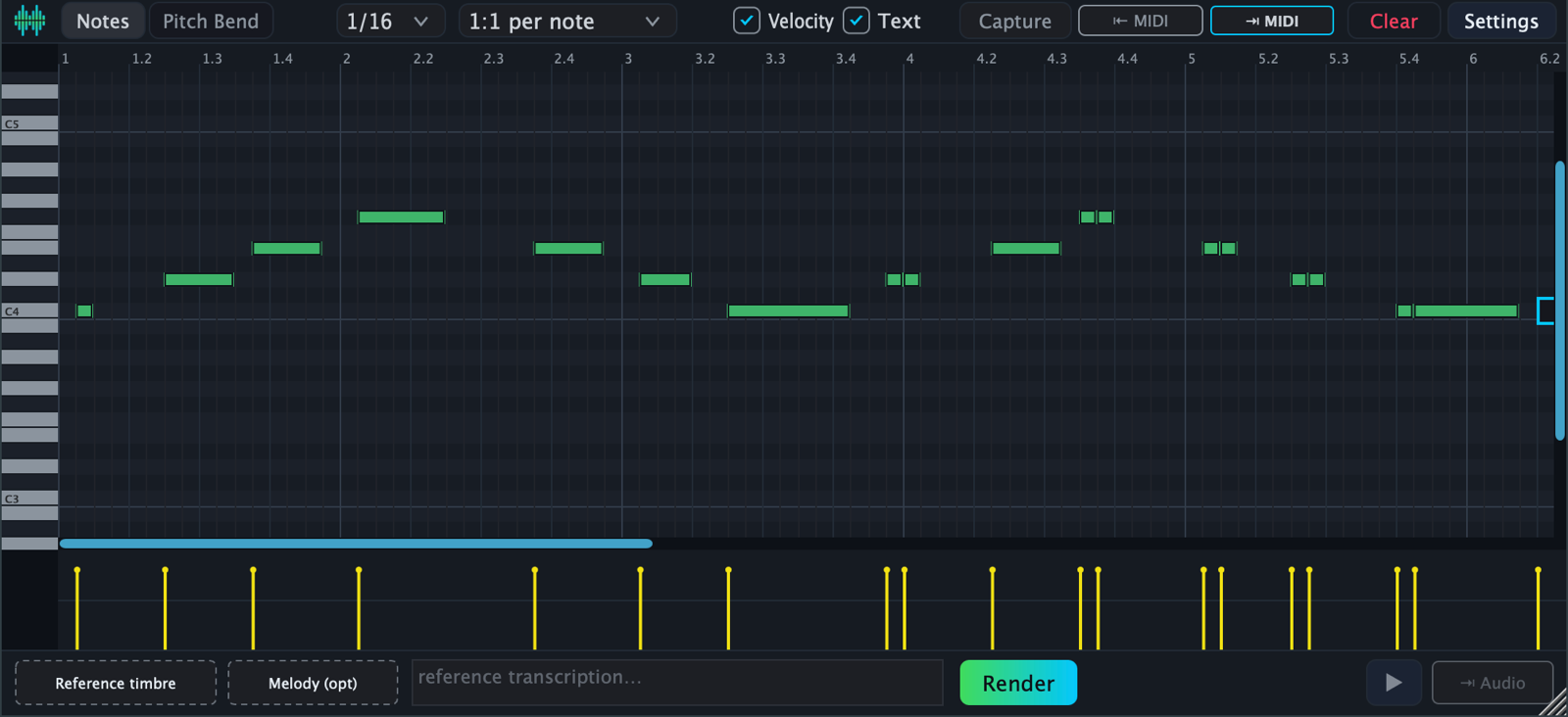
The text2vox piano roll: draw a melody or drop a .mid, add lyrics, render.
Use it from code
curl -X POST "https://api.audialmusic.ai/api/functions/run/text2vox" \
  -H "X-API-Key: your_api_key" -H "X-User-ID: your_user_id" \
  -F "userId=your_user_id" \
  -F "original=@/path/to/voice.wav" \
  -F "text2vox.midi=@/path/to/melody.mid" \
  -F "text2vox.lyrics=la la la la" \
  -F "text2vox.lyricsMode=auto"
import audial
audial.config.set_api_key("your_api_key")
audial.config.set_user_id("your_user_id")
result = audial.text2vox(
reference_file="voice_clip.wav",
lyrics="la la la la",
midi_file="melody.mid",
)
print(result["files"]["folder"]) # sung vocal WAV plus the MIDI it followed# In Claude, Cursor or any MCP client with audial-mcp installed:
"Sing 'hold the line for me' over ~/Music/melody.mid using ~/Music/myvoice.wav as the reference voice."Frequently asked questions
You supply three things: a short reference clip for the voice, a melody as MIDI or audio, and the lyrics. Audial's hosted engine renders a sung performance that follows the melody and the words in that voice.
5 to 10 seconds. You can also pass the text that is said or sung in the clip, which helps the engine line the reference up with your lyrics.
Yes. Drop a .mid onto the piano roll on the website, send it as text2vox.midi with the API call, or point the SDK at it with midi_file. Melody audio works too, as an alternative to MIDI.
Yes. text2vox is a free VST3 and standalone build for macOS on the downloads page. It has the same piano roll and calls the same hosted engine, so it needs your Audial user ID and API key.
A WAV of the sung vocal and a .mid of the melody that was sung, so you can keep editing the part after the fact.
Yes. Text to Vocal is an Audial API function, so it requires an active subscription along with your API key and user ID.